Salesforce for Project Managers

A Deep Dive Into the World's Leading CRM Platform
A research-based breakdown of Salesforce - what it is, how its core features work, and why project managers who understand it have a genuine edge
Most project managers encounter Salesforce the same way. The sales team uses it, the account managers swear by it, and somehow the PM ends up needing data from it without really knowing how to get it. Opportunity values, client contacts, contract details, deal history. All sitting in Salesforce. All slightly out of reach.
This post is about changing that.
Salesforce is the world's leading CRM platform, used by over 150,000 companies globally across sales, service, marketing, and increasingly project delivery. Understanding it properly does not just make you better at navigating a tool your organisation already uses. It makes you a more commercially aware PM who can speak the language of the people you work alongside.
This is the deep dive. All seven core features, how they actually work, what they are designed to do, and a dedicated section on what Salesforce specifically means for a project manager.
What Salesforce Actually Is
Salesforce is a cloud-based Customer Relationship Management platform. At its core it is a system for storing, organising, and acting on information about customers, potential customers, and the interactions your organisation has with them [1].
But that description undersells it considerably. Salesforce has grown into a full enterprise platform with products covering sales automation, customer service, marketing automation, e-commerce, analytics, and application development. The core product that most people encounter is Sales Cloud, which is what this post focuses on. Service Cloud gets its own dedicated section because it is increasingly relevant to project delivery teams.
The architecture is worth understanding before anything else. Salesforce is built around Objects, which are essentially database tables. Standard Objects like Lead, Contact, Account, Opportunity, and Case come built in. Custom Objects can be created to hold any data your organisation needs. Every record in Salesforce is an instance of an Object, and Objects can be related to each other through lookup and master-detail relationships.
This Object-based structure is what makes Salesforce so configurable and also what makes it complex to navigate without understanding the underlying logic.
Feature 1: Leads and Opportunity Management
The journey of a potential customer through Salesforce starts with a Lead.
A Lead is an unqualified prospect. Someone who has expressed interest, downloaded a resource, attended a webinar, or been identified as a potential customer. At this stage the organisation does not yet know whether this person represents a real sales opportunity. The Lead record holds basic information: name, company, contact details, lead source, and status [2].
Lead qualification is the process of determining whether a Lead is worth pursuing. Once qualified, a Lead is converted. Conversion in Salesforce is a specific action that simultaneously creates three new records: a Contact (the person), an Account (the company), and an Opportunity (the potential deal). The Lead record itself is then closed.
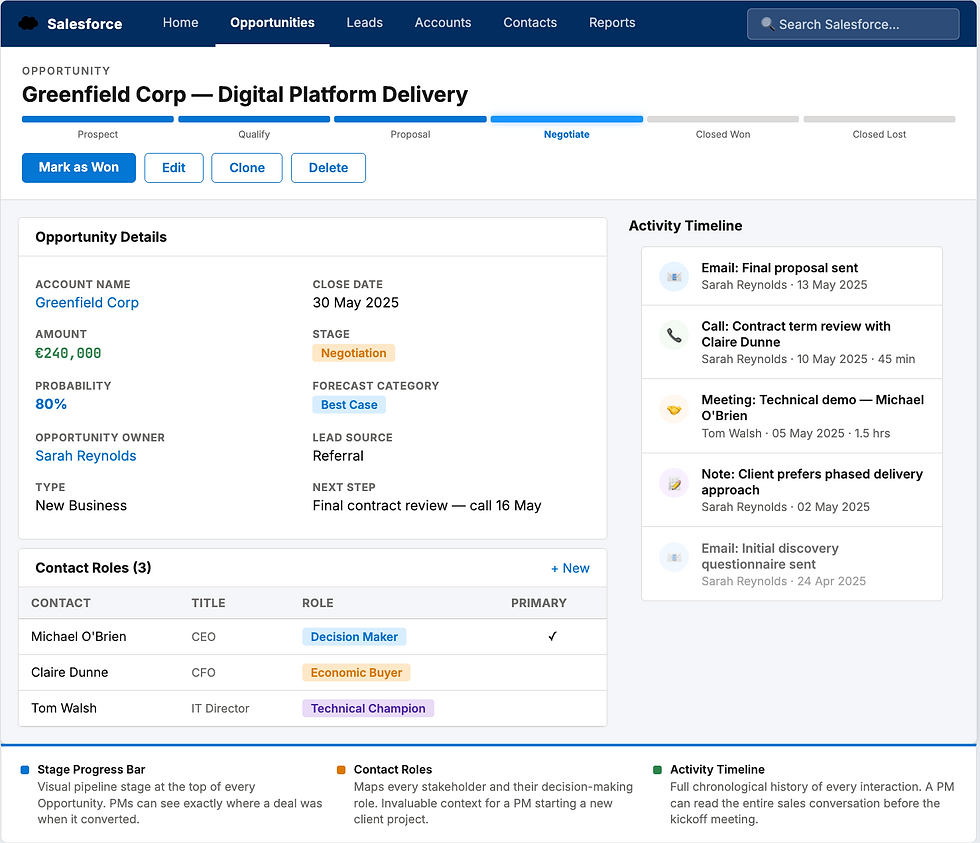
The Opportunity is where the real sales work happens. An Opportunity represents a potential deal with a real prospect. Every Opportunity has:
A name, typically the client name and the deal description. An Account it belongs to. A Close Date, which is the expected date the deal will be won or lost. An Amount, representing the potential deal value. A Stage, which tracks where the deal sits in the sales process. A Probability percentage, which is either manually set or automatically calculated based on the Stage.
Opportunity Stages are configurable and typically follow a progression from initial qualification through to Closed Won or Closed Lost. Common stages include Qualification, Needs Analysis, Proposal Sent, Negotiation, and Closed Won. Each stage has an associated probability that contributes to the forecast.
Why this matters for project managers: When a deal moves to Closed Won in Salesforce, that is the moment a project is born. The Opportunity record contains the financial value, the client details, the expected close date, and the history of how the deal was won. A PM who can read and navigate an Opportunity record starts a project with significantly more context than one who cannot.
Feature 2: Contact and Account Management
Contacts and Accounts are the foundational data objects in Salesforce, and understanding the relationship between them is important.
An Account represents an organisation, a company, or an institution. It is the entity your organisation has a commercial relationship with. Everything in Salesforce eventually connects back to an Account. Contacts belong to Accounts. Opportunities belong to Accounts. Cases belong to Accounts. The Account record is effectively the master file for a client [3].
A Contact represents an individual person at that Account. The same Account can have many Contacts, each with their own role, relationship history, and communication preferences.
Account records typically hold:
The organisation's name, industry, size, and annual revenue. The primary address and website. A description of the relationship. The Account Owner, meaning the person in your organisation responsible for the relationship. Related Contacts, Opportunities, Cases, and Activities.
Contact records hold the individual's name, title, email, phone, and direct relationship to their Account. The Activity Timeline on a Contact record shows every email, call, meeting, and note that has ever been logged against that person, creating a chronological history of the relationship.
Account Hierarchy is a feature worth knowing. Large enterprise clients often have parent companies and subsidiaries. Salesforce handles this through Account Hierarchy, which allows a tree structure of related Accounts. This is particularly relevant for project managers working with large clients where the contracting entity may be a subsidiary of the organisation they actually deal with day to day.
The 360 degree view concept: When all activity is properly logged in Salesforce, the Account and Contact records give any team member a complete picture of the client relationship. A new PM joining a project can open the client's Account record and see the full history of the commercial relationship, all outstanding opportunities, all past projects, every contact, and every communication. That institutional knowledge is enormously valuable.

Feature 3: Sales Pipeline and Forecasting
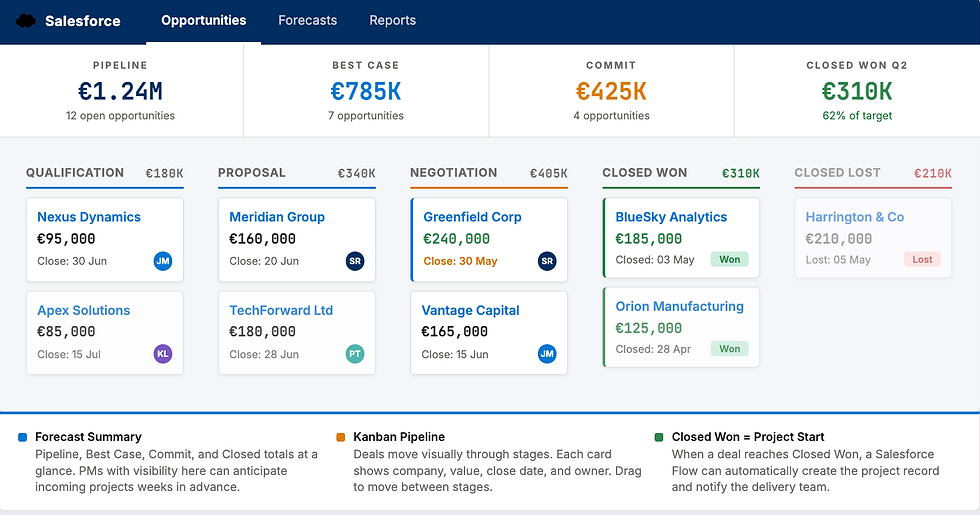
The Pipeline in Salesforce is the aggregate view of all open Opportunities across the sales organisation. It is one of the most important management views in the platform and the one that connects CRM activity most directly to business performance [4].
The pipeline view typically shows all open Opportunities sorted by Close Date, with columns for Account, Stage, Amount, and Probability. Filters allow you to view your own pipeline, a specific team's pipeline, or the full organisation. The Kanban view of the pipeline groups Opportunities by Stage, giving a visual representation of deals moving through the funnel.
Forecasting in Salesforce takes the pipeline data and produces a structured view of expected revenue in a given period. The Forecasting module groups Opportunities into forecast categories:
Pipeline includes all open Opportunities regardless of stage. Best Case includes Opportunities the sales rep believes could close in the period if everything goes well.
Commit includes Opportunities the sales rep is confident will close. Closed includes Opportunities already won in the period. Managers can review their team's forecasts, adjust submitted amounts where their own judgement differs, and roll up to a consolidated forecast for the business.
Forecast accuracy is a key metric in mature Salesforce implementations. Organisations that consistently forecast within 5 to 10 percent of actual closed revenue have reliable pipeline management discipline. Those with wide variance usually have Stage definitions that are not well enforced or probability percentages that are not meaningful.
Why this matters for project managers: The pipeline and forecast directly determine when new projects will arrive and at what scale. A PM with visibility into the Salesforce pipeline can anticipate upcoming work, plan resource allocation in advance, and avoid the reactive scramble that comes from learning about new projects only after the contract is signed. In organisations where delivery teams have access to the CRM, this visibility is a significant operational advantage.
Feature 4: Reports and Dashboards
Salesforce has a full reporting engine built into the platform, and the Reports and Dashboards module is one of its most powerful and most underused features by non-sales users.
Reports in Salesforce are structured queries against the data in the platform. You define which Object you are reporting on, which fields to include, how to filter the data, and how to group and summarise it. Report types include tabular reports for simple lists, summary reports for grouped data with subtotals, matrix reports for two-dimensional grouping, and joined reports for combining data from multiple report types [5].
Every standard report can be exported to Excel or CSV. Custom report types can be built to pull data from related Objects together, for example a report that shows Opportunities with their related Contacts and Activities in a single view.
Dashboards are built from report components. A Dashboard in Salesforce is a collection of charts, tables, and metrics, each driven by an underlying report. Dashboard components can show data as bar charts, donut charts, line charts, funnel charts, metric tiles, tables, or gauges.
Dashboards have a running user setting, which determines whose data security context the dashboard runs in. A dashboard set to run as the logged-in user shows each viewer only the data they have access to. A dashboard set to run as a specific admin user shows the same data to everyone regardless of their own access level.
Dynamic Dashboards allow individual users to see a dashboard populated with their own data without the need to create separate dashboards for each person. A sales manager's pipeline dashboard and a sales rep's pipeline dashboard can be the same component, filtered by the viewer's own records.
What makes Salesforce reporting powerful is that all of the underlying data is transactional and real-time. A dashboard showing this quarter's pipeline is always current because it is pulling live data from actual Opportunity records, not from a manually maintained spreadsheet or a weekly export.

Feature 5: Automations and Flows
Salesforce automation has evolved significantly over the past several years. The platform's primary automation tool is now Flow Builder, a visual point-and-click automation tool that replaced the older Workflow Rules and Process Builder tools [6].
A Flow in Salesforce is a set of automated steps triggered by an event or action. Flows can be:
Record-Triggered Flows run automatically when a record is created, updated, or deleted. For example, when an Opportunity Stage changes to Closed Won, a Flow can automatically create a related Onboarding Task, send an email to the delivery team, and update a custom field on the Account.
Screen Flows present a guided user interface to step someone through a process. For example, a new client onboarding flow that walks a sales rep through capturing all the information needed before handoff to the delivery team.
Scheduled Flows run at a defined time or on a recurring schedule. For example, a daily Flow that identifies all Opportunities with a Close Date in the past that are still open and sends a reminder to the Account Owner.
Autolaunched Flows are triggered by other processes or via API rather than by user interaction.
Flow Builder works through a canvas-based visual interface. You drag and drop elements including decisions, loops, assignments, record lookups, record updates, and subflows. Conditions and branching logic allow complex multi-step processes to be automated without code.
Apex is Salesforce's proprietary programming language for automation scenarios that exceed what Flow Builder can handle. For most project managers and business users, Flow Builder covers everything needed without touching code.
Why automations matter for project delivery: The handoff between a won deal and the start of a project is one of the most common failure points in client-facing organisations. Information gets lost, context is not communicated, and the delivery team starts a project without the full picture. A well-designed Salesforce Flow that triggers on Closed Won and pushes structured information to the project management system eliminates this failure point. The PM gets everything they need at the moment the project starts.

Feature 6: AppExchange and Integrations
The AppExchange is Salesforce's marketplace for third-party applications and integrations. It is one of the things that makes Salesforce genuinely different from most other platforms. With over 7,000 listed apps and solutions, it is the largest enterprise application marketplace in existence [7].
Apps on the AppExchange range from free community-built utilities to enterprise-grade paid products. Categories include analytics and reporting tools, project management integrations, document generation tools, e-signature solutions, financial management add-ons, marketing automation platforms, and industry-specific solutions.
Native integrations within the AppExchange allow Salesforce to connect directly with major platforms:
Slack, which was acquired by Salesforce in 2021, is deeply integrated. Slack alerts can be triggered by Salesforce record changes, and Slack conversations can be linked to Salesforce records.
Microsoft 365 integration syncs Outlook emails to Salesforce activity timelines, syncs calendar events to Salesforce Activities, and connects Teams with Salesforce notifications.
Jira integration via the AppExchange allows project and issue tracking in Jira to be connected to Salesforce Opportunities and Accounts. A PM managing delivery in Jira can surface project status directly within the client's Salesforce Account record.
MuleSoft, another Salesforce-owned product, is the enterprise integration platform for connecting Salesforce to complex external systems, databases, and APIs. For large organisations with multiple systems of record, MuleSoft is how Salesforce sits at the centre of the data ecosystem.
The API: Salesforce exposes a comprehensive REST and SOAP API. Essentially any data in Salesforce can be read, created, updated, or deleted programmatically. This is what allows so many external tools to offer Salesforce integration. For technical project managers working with development teams, understanding that Salesforce data is API-accessible is important context.
Feature 7: Service Cloud
Service Cloud is Salesforce's customer service and support product, and it is increasingly used by project delivery teams as well as traditional customer service functions.
The core object in Service Cloud is the Case. A Case represents a customer issue, request, query, or complaint. Cases are linked to Contacts and Accounts, giving service agents the full relationship context when handling an issue. Cases have a Status, a Priority, an Owner, and an associated SLA [8].
Queues allow Cases to be routed to teams rather than individuals. A new Case comes in, enters the relevant Queue, and the next available team member picks it up or it is automatically assigned based on routing rules.
Omni-Channel routing handles case assignment across multiple channels including email, phone, chat, and social media. Cases created from any channel land in the same system with the same structure.
Knowledge Base is a Service Cloud feature that allows organisations to build a library of articles, FAQs, and how-to guides. Knowledge Articles can be suggested to agents when working on Cases, reducing resolution time. They can also be published to customer-facing portals.
SLA Management and Milestones: Service Cloud allows SLA policies to be defined with specific response and resolution time targets by priority level. If a Case is not updated within the response time window, an escalation rule fires automatically. This milestone tracking within cases is directly analogous to how a PM thinks about deliverable deadlines and escalation thresholds.
Why Service Cloud matters for project managers: In professional services, consulting, and project-based businesses, the line between service delivery and project delivery is blurry. Change requests come in as Cases. Defect reports come in as Cases. Client queries during a project come in as Cases. A PM who understands Service Cloud can work effectively within the same system the client-facing team uses, maintaining a single record of all client interactions throughout delivery.

How Salesforce Helps a Project Manager
This section is for PMs specifically. Everything above is how Salesforce works. This is how it relates to your job.
Before the project starts, the Opportunity record is your intelligence file. It tells you what was promised, what the client expected, what the commercial terms are, and what conversations happened during the sales process. A PM who reads the Opportunity record, the related email activities, and the notes before the kickoff meeting arrives better prepared than one who relies solely on a verbal handoff from the sales team.
During delivery, the Account record is your client relationship hub. You can see every other interaction the organisation is having with the client simultaneously. You know if there is a renewal being discussed, if a complaint has been raised as a Case, or if a new opportunity is in flight. This context prevents the classic problem of a PM having a difficult client conversation about project delays at the same moment the sales team is trying to close an upsell.
Reporting and dashboards give you the ability to build delivery-specific views on top of CRM data. If your organisation tracks project milestones, budgets, or delivery status in Salesforce custom fields, you can build reports that aggregate across all active projects and give leadership a portfolio view without anyone compiling a manual spreadsheet.
Flow Builder is relevant to any PM involved in process design. The handoff from Closed Won to project initiation is a process. The escalation of a delivery issue to the client relationship manager is a process. The monthly project health update to the Account record is a process. All of these can be automated.
AppExchange integrations are the bridge between Salesforce and your PM tooling. If your organisation manages projects in Jira, MS Project, ClickUp, or Monday.com, there is almost certainly an AppExchange integration that connects delivery status back to Salesforce. A PM who can specify what that integration should do, and communicate clearly with the Salesforce admin who configures it, adds significant operational value to their organisation.
The career argument: Salesforce is the most widely deployed enterprise CRM in the world. A project manager who understands it is commercially more valuable than one who does not, particularly in professional services, consulting, technology, and any client-facing delivery environment. It is a genuine differentiator.
Where Salesforce Falls Short
Complexity and cost. Salesforce is expensive and complex to implement well. Licensing costs are significant, and most organisations require a certified Salesforce Administrator to maintain the platform effectively. A poorly configured Salesforce instance, which is very common, is worse than a simple spreadsheet because it creates false confidence in data that is actually incomplete or inconsistent.
Adoption is hard. The platform has so many features that users frequently only engage with a fraction of what is available. Sales teams often resist consistent data entry, meaning the CRM data is only as good as the discipline of the people using it.
It is not a project management tool. Salesforce manages relationships and pipelines. It is not designed to replace a project management tool. Organisations that try to use Salesforce for project delivery end up with complex custom object structures that are hard to maintain. The right model is Salesforce for the commercial relationship and a dedicated PM tool for delivery, with integration between them.
Reporting has a learning curve. The Reports and Dashboards module is powerful but requires time to learn properly. Standard reports cover basic use cases but anything non-standard requires understanding report types, filters, and groupings well enough to build from scratch.
Who Salesforce Is Right For
Salesforce makes sense when your organisation has a substantial sales function with multiple team members managing pipelines. When you have complex, multi-stakeholder client relationships that need a single system of record. When you operate at a scale where manual CRM tracking has broken down. When you need reportable, auditable revenue data. And when you are in professional services, technology, financial services, manufacturing, or any enterprise sector where client relationship data has direct business value.
For smaller organisations or teams earlier in their growth, HubSpot or Monday.com CRM are more accessible starting points. Salesforce is the destination for companies that have outgrown simpler tools.
Salesforce vs the CRM Field
Salesforce | HubSpot | Monday CRM | Dynamics 365 | |
Best for | Enterprise, complex sales | SMB, inbound marketing | Project teams, simplicity | Microsoft ecosystem |
CRM depth | Very High | High | Medium | High |
Ease of use | Low | High | Very High | Medium |
Customisation | Very High | Medium | Medium | High |
Integrations | 7,000+ AppExchange | 1,000+ | 200+ | Strong Microsoft |
Automation | Flow Builder + Apex | Workflows | Basic automations | Power Automate |
Cost | High | Free to Enterprise | Free to $24/user | Medium-High |
PM relevance | High (with integration) | Medium | High (native) | Medium |
Where I'm Taking This Next
Next in the CRM series is HubSpot, the platform that challenged Salesforce's dominance by making CRM genuinely accessible for growing teams. Then a head-to-head: when to choose Salesforce and when HubSpot is actually the better answer.
If this was useful, the infographic version is on my Pinterest. Connect with me on LinkedIn for shorter takes on CRM and PM tools.
Note: This post is research-based, drawn from Salesforce's official documentation, Trailhead learning platform, and how practitioners discuss the platform across the Salesforce community. I am a PM enthusiast sharing what I have learned through deep study, not from direct hands-on Salesforce administration experience.
References
[1] Salesforce. (2025). What is CRM? Salesforce. https://www.salesforce.com/crm/what-is-crm/
[2] Salesforce. (2025). Leads and Opportunities — Sales Cloud. Salesforce Help. https://help.salesforce.com/s/articleView?id=sf.leads_def.htm
[3] Salesforce. (2025). Accounts and Contacts. Salesforce Help. https://help.salesforce.com/s/articleView?id=sf.accounts.htm
[4] Salesforce. (2025). Collaborative Forecasting. Salesforce Help. https://help.salesforce.com/s/articleView?id=sf.forecasts3_overview.htm
[5] Salesforce. (2025). Reports and Dashboards — Overview. Salesforce Help. https://help.salesforce.com/s/articleView?id=sf.analytics_overview.htm
[6] Salesforce. (2025). Flow Builder — Build a Flow. Salesforce Help. https://help.salesforce.com/s/articleView?id=sf.flow_builder.htm
[7] Salesforce. (2025). AppExchange: The leading enterprise cloud marketplace. https://appexchange.salesforce.com/
[8] Salesforce. (2025). Service Cloud — Cases Overview. Salesforce Help. https://help.salesforce.com/s/articleView?id=sf.cases_def.htm
Comments